
Meteogram - Donate
Benny WydoogheWeather
4.351.00 Reviews
- Version
- 2.11.1-20260807_095954
- Installs
- 10.00K
- Age Rating
- Everyone
Screenshots
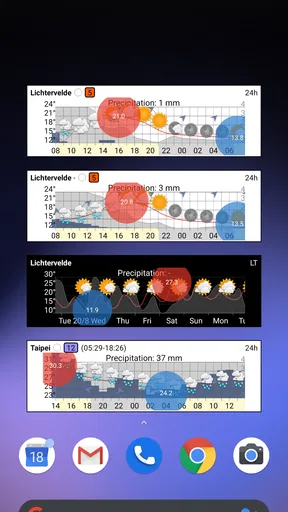
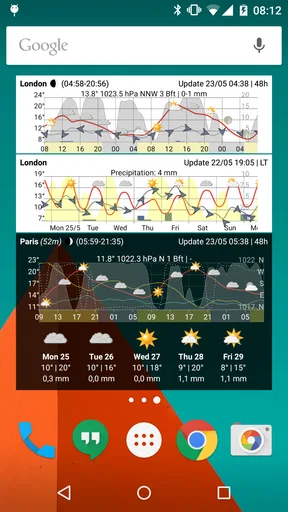
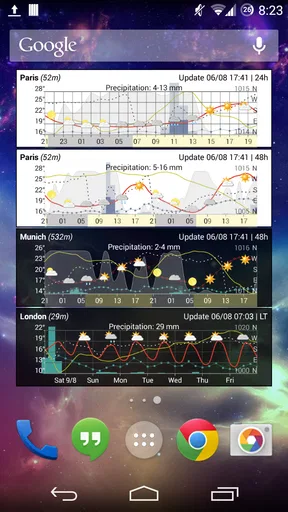
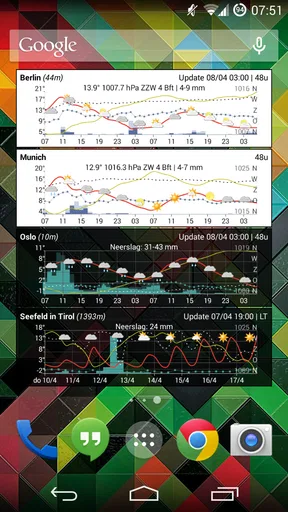
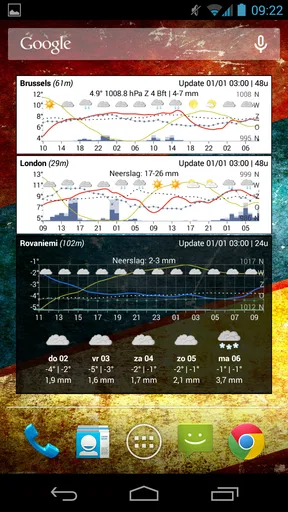
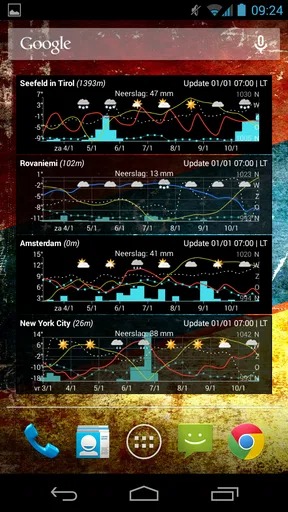
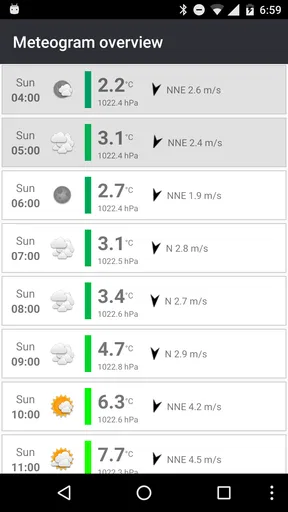
Our Review of Meteogram - Donate
 Analysis by Appyee
I started using Meteogram - Donate because I wanted a weather view that helped me plan around the next few hours, not just glance at a single temperature and move on. It is a paid weather app from Benny Wydooghe, built around a widget and a visual forecast that combines hourly rain, temperature, and a meteogram-style timeline. After spending time with it, my impression is that it serves people who like to read weather patterns at a glance rather than scroll through a conventional forecast.
The app has a focused personality. It is not trying to be a news feed, a severe-weather portal, or a social weather service. Its strength is putting a compact but information-rich forecast close to the home screen. I found that especially useful when deciding whether to walk, cycle, hang laundry outside, leave windows open, or delay a short errand. The display asks me to interpret the coming conditions, but in return it gives more context than the usual single-icon forecast.
How Meteogram - Donate works in a shared household
A realistic household example is a morning when several people are working from home, one person needs to walk somewhere, and another is trying to decide when to run an outdoor chore. Instead of passing around a phone or opening a full weather service repeatedly, the widget can act as a shared visual reference on a device everyone checks. The hourly layout makes it easier to notice a brief rain period and plan around it rather than assume the whole day will be wet.
That shared-device role is also where the app’s design needs a little thought. A weather widget usually reflects the location and preferences configured on the device, so I would treat it as a household display rather than a separate personal account for every resident. If two people live in different places or need different forecast views, a single shared screen may become less convenient than each person using their own weather tool.
I would set it up on the device that is most often used for household planning, then agree on what the displayed location represents. That sounds obvious, but it prevents a common practical mistake: one person changes the location for a trip and everyone else later assumes the widget still shows home conditions. The app is most useful when the household understands whose forecast is currently being shown.
There is no reason to treat the widget as a replacement for direct communication. If someone is leaving for a long journey, organizing an outdoor event, or making a decision where changing conditions matter, I would still tell them to check the forecast themselves. The widget is excellent for quick coordination, but it should not become an invisible authority that everyone assumes is current without looking at its location and update context.
A setup that keeps personal and shared use separate
My preferred arrangement is to use the widget on a shared tablet or a commonly viewed phone only for the home area, while keeping personal travel planning on individual devices. That creates a clean boundary: the household screen answers “what is happening near home?” and each person’s own app answers “what should I expect where I am going?” Meteogram - Donate fits the first job particularly well because its visual forecast can be read quickly without opening a long list of unrelated information.
For a personal phone, I would place the widget where it can be seen during ordinary routines, but I would avoid making it so prominent that it becomes visual noise. The meteogram is information-dense, and that is both its appeal and its main adjustment point. Someone who prefers a large temperature number and one simple weather symbol may find the display busier than necessary.
Before relying on it, I would check the selected location and spend a few minutes learning the timeline. The benefit of a graph-like forecast appears after I understand how to read the changing bands and hourly progression. A family member who only wants “rain or no rain” may need a short explanation, while a weather-focused user will probably appreciate the extra detail immediately.
The Android requirements are also worth considering before installation. The app supports Android six point zero and later, so it is not aimed only at the newest phones. That broad compatibility is helpful for an older household device, although the actual experience will still depend on the screen size and how comfortably the widget fits into the available home-screen space.
Coordination without pretending the widget is a family-control tool
One of the app’s practical advantages is that it can support coordination without requiring a separate family feature. I can imagine using it to choose a school-run departure time, decide when to take bins outside, or identify a dry interval for a short task. The visual timeline encourages a more precise conversation than “the weather looks bad today.” Someone can point to the expected change and say, in effect, “let’s go before that period begins.”
That usefulness has limits. Meteogram - Donate does not turn household members into a coordinated group with shared schedules, messages, or assigned tasks. I would not choose it expecting reminders, family profiles, or a built-in way to notify everyone when conditions change. Its role is informational: it gives the household a common forecast view, while the people still make and communicate the decisions.
There is also a subtle trade-off between a shared display and individual preferences. One person may care most about rain, another about temperature, and another about the broader pattern across the day. A single widget cannot perfectly satisfy all three unless everyone is comfortable with the same arrangement. I see this as a reason to use it as a household reference, not as a replacement for every person’s preferred weather workflow.
The hourly presentation is especially valuable for short-range decisions. If I am planning a walk, I care less about a general statement for the whole day than about whether rain is concentrated around the time I need to leave. For longer-range planning, I would be more cautious and use the app as an overview rather than treating every visual detail as a guarantee. Weather changes, and a clear-looking chart should support a decision, not remove judgment.
Age, trust, and the meaning of a paid weather app
The content rating is Everyone, which makes the app suitable in age terms for a broad household audience. That does not mean every child will find a detailed meteogram intuitive. Younger users may understand a simple weather icon faster, while older children and teenagers who travel independently may benefit from seeing the hourly pattern behind the day’s forecast.
For a child using a shared device, I would explain two boundaries. First, the displayed location needs to remain clear. Second, the forecast is guidance rather than a promise. Those lessons matter more than the visual design itself. The app can help a young user think about whether to bring a coat or choose a different time to go out, but an adult should still make decisions involving safety or rapidly changing conditions.
Trust is also connected to the app’s payment model. Meteogram - Donate costs $2.49, and it also lists optional in-app items priced from $0.99 to $1.84. I prefer knowing that this is a paid product rather than assuming every useful feature must be unlocked through advertising or an ongoing subscription. Still, anyone setting it up on a shared device should understand how purchases are handled on that device and who is responsible for them.
The name includes “Donate,” which gives the product a different feel from a typical free weather download. I see the payment as a sign that the app is aimed at users who value its specialized presentation enough to support it. That makes more sense for a weather enthusiast or someone who checks hourly conditions often than for a casual user who only wants tomorrow’s high and low.
The app has an average rating of 4.3 from around 803 ratings, with roughly 51 written reviews, and it has passed 10K+ installs. Those figures suggest a small but established audience rather than a mass-market weather service. I would read that as a clue about fit: this is a focused tool with a committed user base, not necessarily the default choice for everyone in a household.
Reading the meteogram instead of merely checking an icon
The most important adjustment is learning to read the forecast as a sequence. A standard weather app often encourages a quick glance at one symbol per hour or day. Meteogram - Donate is more useful when I look for transitions: a rain period arriving, temperatures rising through the morning, or conditions changing around a planned activity. The visual format makes those relationships easier to notice once I stop treating it like a single-number display.
One useful workflow is to check it at the start of the day and again before leaving for a time-sensitive activity. The first look helps with broad planning, while the second catches changes that matter immediately. I would not repeatedly refresh it every few minutes, because that turns a helpful overview into unnecessary checking. The app works best as part of a routine rather than as a source of constant reassurance.
Another non-obvious benefit is that the widget can reduce the need to open a full weather application for simple decisions. That matters on a shared phone, where someone may need the device for another task, and on older hardware, where a lightweight glance can feel preferable to navigating a feature-heavy service. The trade-off is that the widget’s compact space cannot explain every detail as fully as a dedicated forecast page.
I also found the visual style better suited to comparing nearby hours than to answering a single direct question. If I ask, “Will it rain sometime today?” almost any weather app can answer. If I ask, “Is there a workable gap between two wet periods?” the meteogram format becomes more meaningful. That distinction is the clearest reason to choose this app over a basic weather widget.
At the same time, people who need radar maps, detailed warnings, storm tracking, air-quality information, or extensive location management may be better served by a larger weather platform. Meteogram - Donate is deliberately narrower. Its value comes from the way it presents hourly rain and temperature, not from trying to cover every weather-related service in one place.
Where the app fits better than usual alternatives
Compared with the weather widget already included on many phones, this app feels more specialized. The default option usually wins for simplicity and zero extra cost, but it may not show the same kind of continuous visual timeline. I would choose the built-in widget for a family member who wants the fastest possible glance, and Meteogram - Donate for the person who wants to understand how conditions evolve over the next several hours.
Compared with a full weather service, the app can feel calmer and more focused. Many mainstream alternatives combine forecasts with news, maps, alerts, videos, and other layers. That breadth can be useful, especially during severe weather, but it can also make a quick household decision slower. This app is a better fit when the main question is about timing rain and temperature rather than researching an entire weather system.
Its paid status also changes the comparison. A free alternative may be easier to recommend to a whole household, particularly when only one person checks the weather occasionally. The purchase becomes easier to justify when the widget is used daily, when the visual format genuinely improves planning, or when a shared screen makes the forecast part of the household routine.
The current version is 2.11.1-20260807_095954. I would still judge it by the way it behaves on the specific device where it will live, especially if that device has a small display or an older Android build. A detailed widget can be excellent on one screen and awkward on another simply because the available space changes how readable the information feels.
Who should use it and who should skip it
I recommend Meteogram - Donate to people who naturally think in time windows. Cyclists, walkers, gardeners, commuters, photographers, outdoor workers, and parents arranging short trips can all get practical value from seeing rain and temperature unfold hour by hour. It is also a good choice for a household that wants one visible home forecast without turning the shared device into a portal full of unrelated content.
I would be more hesitant to recommend it to someone who wants a very simple weather symbol, a large current temperature, or a broad collection of weather tools. The app asks for a little interpretation, and the paid price may feel unnecessary if the built-in phone widget already answers every question that person has. It is also not my first choice for someone whose main concern is emergency alerts or detailed storm analysis.
For families, I would ask one practical question before buying: will several people actually use the hourly view, or will they only glance at today’s temperature? If the answer is the latter, a simpler free option may be more sensible. If the household regularly negotiates departure times and outdoor chores around short rain intervals, the meteogram can earn its place on a shared screen.
I would also keep account boundaries clear. A shared device should show a deliberately chosen home location, while travel and personal forecasts should remain individual checks. That arrangement avoids confusion without requiring features the app is not designed to provide.
My household verdict after using it
Meteogram - Donate is a focused weather widget for people who want to see the next few hours as a pattern, not just as isolated icons. I like the way it turns hourly rain and temperature into something I can use for real planning, especially when a short dry interval matters more than the general forecast for the day.
Its limitations are equally clear. The visual format is not the simplest option, the paid model makes it less attractive for occasional users, and it does not replace a full weather service when I need maps, warnings, or broader context. Shared-device use works well when everyone agrees on the location and understands that the widget is a common reference rather than a personal account or family coordination system.
For me, the purchase makes sense when the app is checked regularly and the meteogram changes how I plan ordinary activities. I would install it on a household device for a family that often works around outdoor conditions, then keep personal travel decisions separate. If that sounds like your routine, this is a thoughtful, specialized weather tool. If you only need a quick temperature and a simple rain symbol, I would save the money and stay with the usual alternative.
Verdict
Strengths of Meteogram - Donate
- Highly customizable weather charts, layouts, colors, and data details.
- Useful at-a-glance forecasts for planning outdoor activities and travel.
- Supports multiple locations for comparing weather conditions easily.
- Detailed information includes temperature, rain, wind, and atmospheric trends.
- Donate version offers an ad-free experience while supporting development.
Limitations of Meteogram - Donate
- The large amount of customization can feel overwhelming for new users.
- Some advanced weather data may depend on the selected forecast provider.
- Charts can be difficult to read on smaller phone screens.
- Weather accuracy may vary significantly by location and data source.
- The app may feel excessive for users who only need basic daily forecasts.
Similar Picks in This Category
View All
Weather - By Xiaomi
Xiaomi Inc.4.1

Weather & Radar Forecast
WetterOnline4.8

Weather
OneLouder Apps4.6

AccuWeather: Weather Radar
AccuWeather3.6

The Weather Channel - Radar
The Weather Channel4.6

1Weather Forecasts & Radar
OneLouder Apps4.3
Frequently Asked Questions
What is Meteogram - Donate, and what does it offer?
Meteogram - Donate is the paid supporter version of the Meteogram weather app. It provides highly customizable weather charts and forecasts that can be displayed as widgets or viewed inside the app. Users can usually adjust the layout, colors, data fields, time ranges, and forecast details, making it useful for people who want more information than a standard weather app provides.
Is Meteogram - Donate different from the free version of Meteogram?
The Donate edition is primarily intended for users who want to support the developer while unlocking or accessing premium features, depending on the current app setup. The exact differences may change with updates, so it is worth checking the Google Play listing before downloading. Existing users should also review whether their preferred widgets and customization tools are included in this version.
What kind of weather information can I see in Meteogram - Donate?
Meteogram - Donate can present detailed forecast information in a visual timeline rather than only showing a simple temperature and condition icon. Depending on the selected provider and configuration, the display may include temperature, precipitation, wind, cloud cover, pressure, humidity, sunrise and sunset, and other measurements. Forecast availability can vary by location and weather-data source.
Does Meteogram - Donate work as a home-screen widget?
Yes, one of the main reasons to use Meteogram - Donate is its customizable home-screen widget experience. After installation, you can add a widget through your Android launcher and configure its appearance and forecast data. Widget behavior may differ between Android versions and manufacturers, especially when battery-saving settings restrict background updates or location access.
Does Meteogram - Donate require location access or an internet connection?
The app needs an internet connection to download current weather conditions and updated forecasts. Location permission is useful if you want Meteogram to identify your position automatically, but you may be able to select a location manually instead. For reliable updates, allow the app to use network access and review battery-optimization settings if widgets stop refreshing.
